A successful business requires disciplined financial planning and a systematic approach. Managing business finances means more than tracking income and expenses. It demands a clear understanding of cash flow and how funds are allocated across operations.
A clear understanding of how money is spent enables you to spot areas for improvement and make informed decisions that keep your business financially healthy.
To support this process, TallyPrime offers two useful tools—cost centers and cost categories. These features help you break down your financial data for clearer insights into your business expenses.
Now that you understand why financial insight is important, let’s look closely at how cost centers and cost categories in Tally Prime support this process.
Cost Center
A cost center is simply a part of your business where money is spent. It focuses on cost control and typically does not generate revenue, but in some cases, it can indirectly contribute to profit.
Departments such as HR, administration, or customer support do not generate revenue directly, yet the business cannot function without them. These functions are classic examples of cost centers.
In Tally Prime, you can create cost centers to track expenses for different areas such as departments, employees, projects, or even branches.
For example, if your business incurs travel expenses, you do not need to record them as one total amount. Instead, you can allocate them based on the responsible person or department to provide clearer insights.
Why Cost Centers Matter in Business?
One of their main purposes is to track and control expenses within a budget.
Managers of cost centers are usually responsible for controlling costs, even though they are not responsible for generating revenue.
This creates accountability and helps businesses identify areas of overspending.
- Compare spending across departments
- Improve efficiency
- Plan budgets more accurately
In simple words, cost centers help you stay in control.
Types of Cost Centers
Cost centers can be classified in different ways depending on how the business operates. The most common types are:
Production Cost Centers
These are departments where products are manufactured or processed.
Example: Assembly unit or production floor
Service Cost Centers
These departments provide support services to other departments.
Example: HR, marketing, administration
Both production and service cost centers are essential to your business’s smooth operation, even though they do not generate revenue.
They ensure the business operates efficiently without directly producing goods.
Cost Category
Tracking expenses is not enough as businesses grow. With more departments, projects, or locations, organization is key. Cost category helps manage this complexity.
A Cost Category is a way to group different cost centers so that you can organize your financial data in a structured manner. It helps businesses view their expenses from multiple angles, rather than relying on a single level of analysis.
Simply put, a cost center shows where money is spent, while a cost category’s main purpose is to organize and classify these centers for deeper financial understanding.
How Cost Category Works?
A cost category acts as a parent group for cost centers. You can create multiple categories and, within each, define different cost centers.
For example, a company can create:
Department Category, such as
- Sales
- Marketing
- HR
Location Category, like
- Kochi
- Trivandrum
- Bangalore
When recording a transaction, a single expense can be allocated to different categories. This enables tracking expenses across departments and locations simultaneously.
This ability to track expenses across several categories is the main power of cost categories. It ensures clearer visibility, which is their central purpose.
Key Features of Cost Category
Cost categories in TallyPrime offer several useful features that improve accounting efficiency:
Multiple Grouping Levels
You can create more than one cost category, which allows detailed classification of expenses.
Parallel Tracking
The same cost center can be used under different categories, making it easier to analyze data from different perspectives.
Flexible Reporting
You can generate reports by category, which helps with better financial analysis.
Structured Data Management
It keeps financial data organized, especially for businesses with complex operations.
Benefits of Using Cost Categories
Using cost categories brings several advantages:
Better Financial Visibility: You can clearly see how money is spent across different dimensions.
Improved Decision-Making: Detailed reports help management make smarter decisions.
Time-Saving Analysis: No need to manually separate data—it is already structured.
Better Planning and Budgeting: Helps in setting accurate budgets for different areas.
How to Create a Cost Center and Cost Category in Tally Prime?
(To make these steps easier to follow, screenshots are required.)
Creating cost centers and cost categories in TallyPrime helps efficiently track and manage business expenses. These tools allow for detailed allocation and reporting, enabling better analysis.
Let’s understand how to create both step by step.
Creating a Cost Center in Tally Prime
Steps to Create a Cost Center:
- Go to the Gateway of Tally
- Select Chart of Accounts
- Choose Cost Centers
- Click on Create
- Enter the following details:
- Name of Cost Center (e.g., Sales, HR, Kochi)
- Category (select the cost category created earlier)
- Under (choose parent cost center or Primary)
- Press Ctrl + A to save
By default, TallyPrime groups all cost centers under the Primary Cost Category, but you can assign them to other categories as needed.
Creating Multiple Cost Centers
Step 1. Enable cost center
F11: Features – Enable cost centers : Yes

Step 2: Cost category creation
gateway of tally – create- show more-cost category
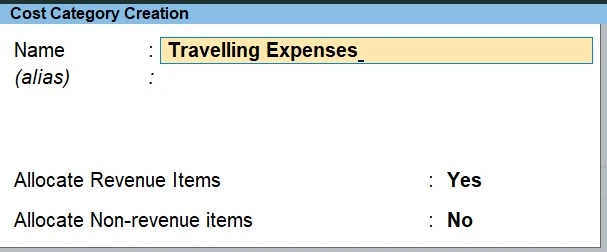
Multi cost category
gateway of tally- chart of accounts-cost categories-multi masters- create
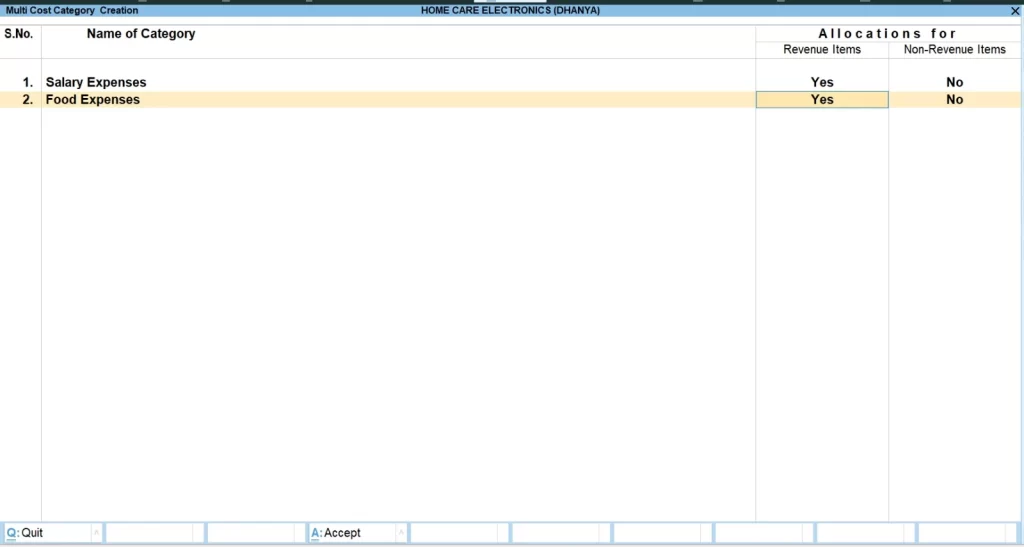
Step 3: Cost centre creation
Gateway of tally- create-cost centre
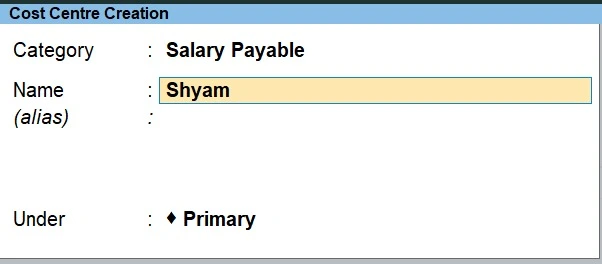
Creating Multiple Cost Centers
Gateway of tally- chart of accounts-multi masters-multi create
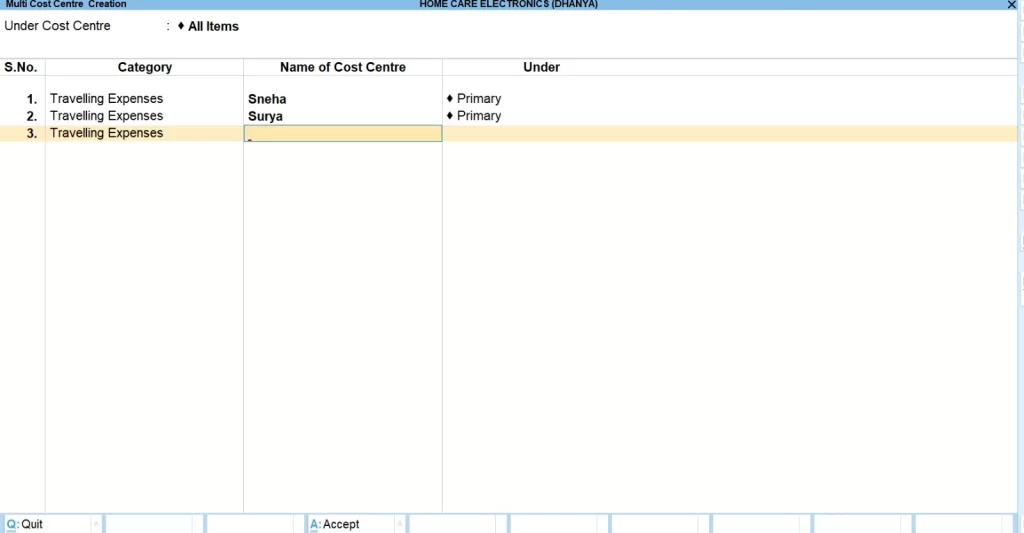
Final Thoughts
Cost Centers and Cost Categories in TallyPrime are essential tools for modern business accounting.
A cost center lets you track where money is being spent, while a cost category helps you organize and analyze that spending in a structured way.
When used together, they give you a clear understanding of your business finances, improve cost control, and support better decision-making.
If you are planning to build practical accounting skills, enrolling in a Tally course in Bangalore can help you understand these concepts with real-time examples and hands-on practice.
In simple terms, they let you move from just recording numbers to actually understanding your business, which leads to long-term success.
FAQs
Who is managing a cost center?
A department head or team manager often manages a cost center. They are responsible for monitoring expenditures and ensuring they remain within the allotted budget. Although they do not generate income directly, they are vital to the department’s cost management and efficiency.
Is it possible to create multiple cost categories in TallyPrime?
Yes, TallyPrime allows you to create multiple cost categories to organize cost centers under different groups. This feature improves reporting and clarifies expenses for more effective financial analysis.
What happens if cost centers are not assigned to transactions?
If you do not assign cost centers, your account will still record the transaction normally. However, you will miss out on detailed insights about where the expense belongs. This reduces the usefulness of reports and makes it harder to analyze and control costs effectively.
Are cost categories useful for small businesses?
Yes, cost categories can be useful even for small businesses, especially if they want better control over expenses. While small businesses may not always need multiple categories, using them can still improve financial clarity and help in planning as the business grows.
Is it necessary to create cost categories before cost centers?
You do not need to create cost categories before cost centers. By default, TallyPrime provides a Primary Cost Category. However, if you want detailed and structured tracking, create additional cost categories before cost centers for better organization.